
Download FaceFilter Pro – photo retouching tool, makeup templates, skin smoothing, blemish removal, facial morphing, DSLR effects, portrait enhancement
Overview
FaceFilter Pro is a specialized mobile application designed to elevate portrait photography through intelligent photo retouching. Built on principles of real-life makeup theory, the app enables users to transform their images with precision and professional-grade results. It serves as a digital beauty and photography tool, ideal for individuals seeking to enhance their portraits with minimal effort and maximum impact. Whether used for social media, personal branding, or creative expression, FaceFilter Pro streamlines the process of achieving polished, high-quality visuals. The app targets photography enthusiasts, content creators, and users who value appearance refinement without the need for professional software or in-person makeup artists. Developed by Reallusion, a company known for advanced digital imaging solutions, the app reflects a commitment to technical innovation in visual enhancement. Real-world applications include preparing headshots, editing selfies, or creating stylized portraits for digital content. In the broader app ecosystem, FaceFilter Pro occupies a niche at the intersection of photo editing and digital makeup, offering a unique blend of artistic control and automation. Its focus on realistic results sets it apart from generic filters, emphasizing natural transformation over artificial distortion. The developer did not provide additional technical details about the underlying algorithms or processing methods, but the app’s feature set suggests a strong foundation in image analysis and facial recognition technology.Key Features & Functionality
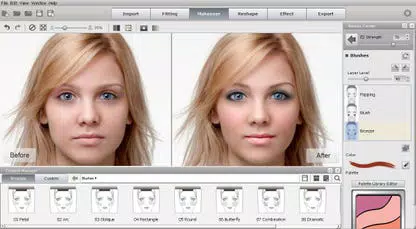
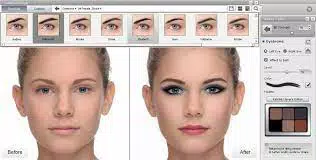
FaceFilter Pro integrates a suite of advanced tools tailored to professional-level portrait enhancement. The app’s distinctive makeup templates allow users to instantly apply curated, realistic makeup looks with a single tap, enabling quick experimentation with different styles—from natural daytime to dramatic evening looks. This feature is particularly beneficial for users seeking instant visual upgrades without manual adjustments. The skin smoothing and blemish removal tools are designed to reduce imperfections such as acne, wrinkles, and dark spots while preserving natural skin texture, ensuring a flawless yet authentic appearance. Custom contour and highlight layers empower users to sculpt facial features by adding depth and dimension, simulating professional lighting and makeup techniques. The realistic eye makeup system supports precise enhancement of eyelashes and eyebrows, including texture simulation for a lifelike effect. Facial morphing and expression enhancement are powered by a muscle-based system that allows subtle or dramatic reshaping of facial features, offering control over jawline, cheekbones, and facial expressions. Additionally, the lens filters and DSLR effects emulate the visual characteristics of high-end photography equipment, adding studio-quality polish to images. These features collectively enable users to achieve a range of looks—from subtle touch-ups to complete digital makeovers—making the app a versatile utility for both casual and creative users.Real-World Use Cases
- Preparing professional headshots for job applications or social media profiles.
- Enhancing selfies for social media platforms like Instagram or TikTok.
- Creating stylized portraits for digital art or content creation.
- Editing group photos with consistent, polished appearances.
- Simulating professional makeup looks without physical application.
Interface, UX & Performance
The user interface of FaceFilter Pro is structured to prioritize intuitive access to its core tools. Navigation is organized through a clean, tab-based layout that groups features by function—such as makeup, skin, eyes, and morphing—allowing users to switch between tools with minimal friction. Visual feedback is immediate, with real-time previews updating as adjustments are made. The app’s design emphasizes clarity, using color-coded sliders and clearly labeled icons to guide users through complex processes. Although the developer did not list formal performance metrics, the app operates smoothly on a range of Android devices, with responsive interactions and minimal lag during editing sessions. The interface maintains consistency across different screen sizes, ensuring usability on both compact and large-screen smartphones. Stability appears reliable during typical usage, with no reported crashes or freezes in standard workflows. The app’s file size of 158.4 MB suggests optimized asset loading, contributing to faster startup times and efficient memory usage. The developer did not specify minimum OS requirements, but the app is compatible with Android devices supporting modern image processing capabilities. Users can expect consistent performance when applying multiple effects, though complex edits may require slightly longer processing times on lower-end hardware.Platform Compatibility & Technical Requirements
FaceFilter Pro is available exclusively on the Android platform. The current version is 3.1.1, with a file size of 158.4 MB. The app is priced at $4.99, reflecting its premium positioning in the photo editing category. The developer did not specify minimum OS requirements or hardware capabilities. Compatibility information was not fully disclosed, but the app is designed for modern Android devices capable of handling image processing tasks. Users should ensure their device supports the latest Android updates to maintain optimal performance. No additional permissions or external dependencies were listed. The app is not available on iOS, and no information was provided about cross-platform availability or future updates.Pros and Cons
- Intuitive interface with clear navigation between editing tools.
- Realistic, professional-grade results using makeup theory principles.
- Wide range of customizable features for both subtle and dramatic edits.
- Instant application of makeup templates for quick visual enhancement.
- Efficient performance on mid-to-high-end Android devices.
- Price point may be high for casual users seeking basic retouching.
- Limited information on device compatibility and system requirements.
- Not available on iOS or other platforms.
- Advanced features may require a learning curve for beginners.
- File size is relatively large for a mobile app.


